Transport protocol
The data between the PC and STM is Protobuf preceeded by a 7-byte header and 5+n byte header.
The header itself consists of the following bytes:
| Description | Amount of bytes | Value |
|---|---|---|
| Start bytes | 1 | 0x2 |
| Sender receiver | 1 | 0x0* |
| Message ID | 1 | 0x0 |
| Size of content | 2 | number of bytes in content |
| Checksum of content | 1 | checksum of content (everything after 7th byte) |
| Checksum of header | 1 | checksum of header (first 6 bytes, skipping the leading 0x2) |
Sender receiver
The sender-receiver value is documented as follows
Enums
| Value | Description |
|---|---|
| PC | 0 |
| nRF | 1 |
| STM | 2 |
| STM - Memory | 3 |
Left 4 bits represent a sender Right 4 bits represent a recipient
STM - Memory has been separated for memory operations (Import, Export), due to ease of implementation.
The content consists of the following bytes:
| Description | Amount of bytes | Value |
|---|---|---|
| Protobuf Structure ID | 2 | Structure ID |
| Type | 1 | 12 |
Size of Protobuf content | 2 | number of bytes in the Protobuf content |
Protobuf content | n | The Protobuf content that's being sent |
Checksum
The message checksum is calculated by summing all bytes together and overflowing at a byte (sum % 256).
Structure ID
These structures are connected to the ones accessible here.
| Structure | ID |
|---|---|
Command | 0x10 |
Project | 0x11 |
Station | 0x12 |
Test | 0x13 |
Measurement | 0x14 |
RESERVED | 0x15 |
Result | 0x16 |
Setting | 0x17 |
Ota | 0x18 |
TesterInfo | 0x19 |
OtaInfo | 0x20 |
ExportCommand | 0x21 |
Communication enums
To include the communication enums starting with C_G_ into your own project, you can visit our public repository for them.
Then simply include the files and use them.
Fixed enums
There are a few enums that are fixed and aren't generated
OTA
Commands
| enum | number |
|---|---|
OTA | 100 |
Parameters
| enum | number |
|---|---|
Init | 101 |
OtaErase | 102 |
ShowUpdatePopup | 103 |
Responses
| enum | number |
|---|---|
OK | 150 |
N_OK | 151 |
Tester info
Commands
| enum | number |
|---|---|
TesterInfo | 200 |
End
Commands
| enum | number |
|---|---|
End | 400 |
Import/Export
Commands
| enum | number |
|---|---|
Import | 300 |
Export | 301 |
Parameters
| enum | number |
|---|---|
Project | 350 |
Station | 351 |
Test | 352 |
Measurement | 353 |
Communication
The communication is based on Google's Protocol Buffer protocol, which generates code at build time.
The protocol schema is defined inside of a schema (*.proto) file, which is used to statically generate code and structures needed to serialize and deserialize bytes.
CLI Tool
ProtoBuf provides a CLI tool, called protoc, which can be used to generate the code and inspect the generated packets.
Code generation
To generate the code using the protoc tool, you will first need a schema.
Schema
A simple schema can be something like this:
message Example {
    int32 id = 1;
}
Which would, after the code generation, create an object that contains a single varint.
Code generation
To generate the code from the above schema, you will have to save it into a file, for this example test.proto, and run:
$ mkdir csharp
$ protoc test.proto --csharp_out=csharp/
Which should result in a new file, located at csharp/Test.cs, with code that can serialize and deserialize packets.
Code generation inside of the project
To generate the code inside of the project, you can follow two instructions:
NixOS / Nix-enabled Linux
You have to open the Memory repository and type nix develop to get the required dependencies installed.
Then you simply run update_protobuf in the root of the Memory and new code should be generated
Windows / Other Linux distros
You have to clone the Memory repository.
You have to make sure you have Python 3.10 (or newer) installed, and Protobuf 27 (exactly) installed.
Then you simply run
Linux
protoc --plugin=protoc-gen-eams=protoc-gen-eams -I.. --eams_out=../generated communication.proto
Windows
protoc --plugin=protoc-gen-eams=protoc-gen-eams.bat -I.. --eams_out=..\generated communication.proto
in the root of the Memory and new code should be generated.
Printing binary contents
To figure out what is in the binary file generated from the program, you can use the following command:
$ protoc --decode Test --proto_path=. test.proto < test.bin
Which should result in:
id: 1
Schema
The schema that's used in the Centipede communication is the following:
syntax = "proto3";

syntax = "proto3";

message Command {
    int32 command = 1;
    optional int32 parameter = 2;
    optional string filter = 3;
}

message Project {
    UID project_id = 10;
    optional string client_code = 12;
    optional string site_code = 13;
    optional int32 last_update = 14;
    optional string project_name = 15;
}

message TestPlan {
    UID testplan_id = 20;
    string testplan_code = 21;
    string testplan_name = 22;
    bool locked = 23;
    repeated ResultSetting settings = 24;
    optional string description = 25;
    int32 lockPin = 26;
}

message Step {
    UID step_id = 30;
    UID parent_id = 31;
    int32 seq_num = 32;
    repeated ResultSetting results = 33;
    repeated Measurement measurements = 34;
    repeated ResultSetting settings = 35;
    optional string instruction = 36;
}

message Measurement {
    int32 measurement_number = 40;
    repeated ResultSetting results = 41;
    repeated ResultSetting settings = 42;
    optional int32 text_id = 43;
}

message DUT {
    UID dut_id = 50;
    string dut_code_or_serial = 51;
    optional UID project_id = 52;
    optional UID testplan_id = 53;
    repeated ResultSetting results = 54;
    optional int32 last_update = 55;
    optional string model_or_vin = 56;
    optional string plate_number = 57;
    optional string manufacturer = 58;
    repeated ResultSetting settings = 59;
    optional int32 ampacity_override = 60;
    optional int32 cable_length = 61;
    optional int32 phases_override = 62;
}

message ResultSetting {
    int32 name_enum = 60;
    optional ResultSettingValue value = 61;
    optional LimitValue limit = 62;
}

message ResultSettingValue {
    optional float numeric_value = 70;
    optional int32 descriptive_value = 71;
}

message LimitValue {
    optional float limit_low = 80;
    optional float limit_high = 81;
}

message Ota {
    int32 seq_num = 90;
    int32 address = 91;
    bytes byte_array = 92;
}

message UID {
    uint32 serial_counter = 100;
    uint32 timestamp = 101;
}

message TesterInfo {
    string fw_ver = 110;
    string hw_ver = 111;
    int32 protocol_version = 112;
    string ag_version = 113;
    int32 serial_number = 114;
    string model = 115;
    int32 last_calibration_date = 116;
    int32 communication_line = 117;
}

message OtaInfo {
    int32 number_of_packets = 120;
    int32 overall_crc32 = 121;
    string firmware_version = 122;
}

message UpdatePacket {
    OtaInfo info = 130;
    repeated Ota packets = 131;
}

message ImportExportCommand {
    optional int32 parameter = 140;
    repeated UID path_sections = 141;
    optional int32 seq_num = 142;
    optional bytes query = 143;
}

message DateTimeZoneCommand {
    int32 timezone = 150;
    int64 epoch = 151;
}

message CommandEnums {
    int32 Ota = 100;
    int32 Ok = 101;
    int32 Nok = 102;
    int32 TesterInfo = 103;
    int32 Import = 104;
    int32 Export = 105;
    int32 End = 106;
}

message ParameterOtaEnums {
    int32 Start = 108;
    int32 OtaErase = 109;
    int32 ShowUpdatePopup = 110;
    int32 CreateBridge = 111;
    int32 DestroyBridge = 112;
    int32 GoToBootloader = 113;
    int32 GoToApp = 114;
}

message ParameterEntityEnums {
    int32 Project = 111;
    int32 DUT = 112;
    int32 DUTStep = 113;
    int32 TestPlan = 114;
    int32 TestPlanStep = 115;
    int32 Root = 116;
    int32 TestPlanRoot = 117;
    int32 Manufacturer = 118;
    int32 VisualText = 119;
}

message StructureIDs {
    int32 Command = 10;
    int32 Project = 11;
    int32 DUT = 12;
    int32 DutStep = 13;
    int32 TestPlan = 14;
    int32 TestPlanStep = 15;
    int32 Result = 16;
    int32 Setting = 17;
    int32 Ota = 18;
    int32 TesterInfo = 19;
    int32 OtaInfo = 20;
    int32 ImportCommand = 21;
    int32 ExportCommand = 22;
    int32 DateTimeZoneCommand = 23;
    int32 Manufacturer = 24;
    int32 VisualText = 25;
}
Database entries
The database consists of different tables, which connect with one to many relations. The relations are specified using a "parent id" on the children elements.
UID
UID is a structure storing instrument serial number and a timestamp, thus providing a unique identifier
| Field | Type |
|---|---|
| instrument_serial | int32 |
| timestamp | int32 |
The instrument_serial field doesn't use first 5 bits, so we use them as a counter.
The counter helps us when data is saved multiple times in a single second.
The timestamp field is in seconds since EPOCH (01-01-1970).
Project
Project is a top-level structure, which stores a name and code.
| Field | Type |
|---|---|
| Project ID | UID |
| Project code | string |
| Client code | string |
| Site code | string |
| Time of last update | int32? |
Test Plan
Test plan is a top-level structure, which defines a testing procedure.
| Field | Type |
|---|---|
| TestPlan ID | UID |
| TestPlan code | string |
| TestPlan name | string |
| Settings | [ResultSetting] |
| Description | string? |
Step
Step is a structure that holds results, measurements, settings, instructions and sequence number. It can be found in both Test Plans and Workspaces.
| Field | Type |
|---|---|
| Step ID | UID |
| Parent ID | UID |
| Sequence number | int32 |
| Results | [ResultSetting] |
| Measurements | [Measurement] |
| Settings | [ResultSetting] |
| Instruction | string? |
Measurement
Measurement holds a measurement number, results and settings.
| Field | Type |
|---|---|
| Measurement number | int32 |
| Results | [ResultSetting] |
| Settings | [ResultSetting] |
DUT
Dut structure represents the device under test.
| Field | Type |
|---|---|
| DUT ID | UID |
| DUT Code | string |
| Project ID | UID |
| Testplan ID | UID? |
| Results | [ResultSetting] |
| Last update | int32? |
ResultSetting
ResultSetting is a structure that holds values common to both Result and Setting.
| Field | Type |
|---|---|
| Name enum | int32 |
| Value | ResultSettingValue? |
| Limit | LimitValue? |
ResultSettingValue
ResultSettingValue stores either Numeric or Descriptive values.
| Field | Type |
|---|---|
| Numeric value | float? |
| Descriptive value | int32? |
LimitValue
LimitValue stores the low and high values of the limit.
| Field | Type |
|---|---|
| Limit low | float? |
| Limit high | float? |
Export procedure
Export is done using the ExportCommand structure from the previous chapter.
When executing, the Command structure's fields represent the following:
| Field | Meaning |
|---|---|
| Command | Always set to Export |
| Parameter | Type being exported (Project, Station, Test, Measurement, Graph, Result) |
| Parameter2 | Parent UID, empty if the Parameter is set to Project |
When exporting process has produced all items that fit the specified filter, the End command is sent.
Exported data
When the data is in the process of being exported, every export item is preceeded by an ImportExportCommand protobuf, which contains the data about the UIDs, which can then be used to generate a path on the filesystem.
The ImportExportCommand also contains some flags, which can give us some additional information.
Command
The command structure is made of multiple parameters, of which only one is mandatory.
| Field | Type |
|---|---|
| Command | int32 |
| Parameter | int32? |
| Filter | string? |
Command field
The command field can contain an enum from the below table.
| Enum | Value |
|---|---|
Ota | 100 |
Ok | 101 |
Nok | 102 |
TesterInfo | 103 |
Import | 104 |
Export | 105 |
End | 106 |
DateTime | 107 |
Parameter field
The parameter field can contain an enum from the below table
| Enum | Value |
|---|---|
Start | 108 |
OtaErase | 109 |
ShowUpdatePopup | 110 |
Project | 111 |
DUT | 112 |
DUTStep | 113 |
TestPlan | 114 |
TestPlanStep | 115 |
Folder field
The parameter field can contain an enum from the below table
| Enum | Value |
|---|---|
CUSTOM TESTPLAN | 116 |
FACTORY TESTPLAN | 117 |
USED TESTPLAN | 118 |
Filter field
The filter field can be a UNIX time integer to set the Hamilton time using DateTime command.
ImportExport command
The ImportExportCommand is a structure that contains path to the information it wants to import/export and a property that explains what type you're looking for.
ImportExportCommand is also used as a precursor before the exported item, so that we know where to store the data that follows it.
| Field | Type |
|---|---|
| Parameter | int32? |
| Folder | int32? |
| Path sections | [UID] |
Ota message
Ota is a structure that holds values needed for OTA update.
| Field | Type |
|---|---|
| sequence number | int32 |
| address | int32 |
| byte_array | byte_array |
Tester info
Tester info is the response to command TesterInfo.
| Field | Type |
|---|---|
| Firmware STM | string |
| Firmware nRF | string |
| Protocol version | string |
| Serial number | int32 |
| Model | string |
| Last calibration date | int32 |
OtaInfo message
OtaInfo is a structure that holds values needed for OTA update.
| Field | Type |
|---|---|
| number of packets | int32 |
| overall crc32 | int32 |
| firmware_version | string |
OTA Update
STM Update
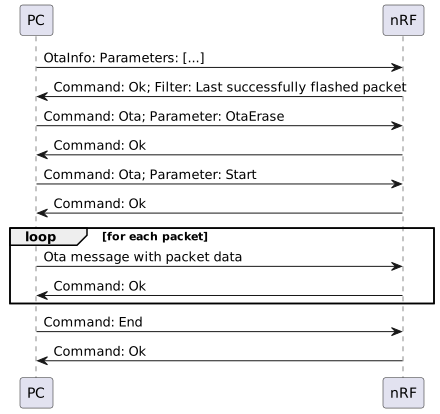
STM can update itself through OTA. It will flash itself through IAP and after verifying the flashed data, it will restart into the new application.
OTA has a few communication enums that can be passed into the Command message:
| Command | Parameter | Description |
|---|---|---|
Ota | OtaErase | Erases the flash and prepares for flashing |
Ota | ShowUpdatePopup | Shows the update popup that notifies the user that an update is underway |
Ota | Start | Tells the instrument that the update will follow |
OtaErase should be sent if the instrument returned 0 in the Ok after the OtaInfo packet.
If there are some packets present on the instrument, we should skip that many packets and continue from where it was last.
ShowUpdatePopup should be sent before a device starts updating and should be sent for both nRF and STM updates. The popup hides when the End is sent at the end of update.
OtaInfo contains a field overall_crc32, which should be compared with the last update that was done, so that we can track if there are some packets of this update already present or not.
OTA has a message called OTA with three fields:
| Field | Description |
|---|---|
seq_num | Number of the packet in the update procedure |
address | The location the bytes will be written to |
byte_array | The bytes to be written |
OTAInfo has a message called OTAInfo with three fields:
| Field | Description |
|---|---|
number_of_packets | Number of all packets in the update procedure |
overall_crc32 | CRC32 calculated over the whole binary |
firmware_version | Version of the new firmware |
OTA also reuses the global End command:
| Command | Parameter | Description |
|---|---|---|
End | Finish the update |
After the End command is sent, the STM verifies the flashed parts of the flash, switches to the new application and reboots.
If the overall checksum doesn't match, it returns N_OK and shows a popup, otherwise it returns OK and reboots.
Replies
Commands OtaErase, Start and End will reply with OK or N_OK commands depending on the status of the command that was executed last.
STM Update procedure
Text formats
Texts
| Text | Length | Unique | Allowed characters |
|---|---|---|---|
| Various codes | 20 | YES | Numeric |
| Various names | 20 | NO | FW_ALL |
| Instruction | 1000 (bytes) | NO | FW_ALL |
| Description | 1000 (bytes) | NO | FW_ALL |
| All other text | 5000 (bytes) | NO | ALL |
Allowed characters
Numeric
- 0-9
Code 39
- A-Z
- 0-9
- - . $ / + %
- space
File name characters
All except <>:"/\|?*
FW_ALL valid characters
| UNICODE | SIGN |
|---|---|
| \u0020 | <space> |
| \u0021 | ! |
| \u0022 | " |
| \u0024 | $ |
| \u0025 | % |
| \u0027 | ' |
| \u0028 | ( |
| \u0029 | ) |
| \u002a | * |
| \u002b | + |
| \u002c | , |
| \u002d | - |
| \u002e | . |
| \u002f | / |
| \u0030 | 0 |
| \u0031 | 1 |
| \u0032 | 2 |
| \u0033 | 3 |
| \u0034 | 4 |
| \u0035 | 5 |
| \u0036 | 6 |
| \u0037 | 7 |
| \u0038 | 8 |
| \u0039 | 9 |
| \u003a | : |
| \u003b | ; |
| \u003c | < |
| \u003d | = |
| \u003e | > |
| \u003f | ? |
| \u0040 | @ |
| \u0041 | A |
| \u0042 | B |
| \u0043 | C |
| \u0044 | D |
| \u0045 | E |
| \u0046 | F |
| \u0047 | G |
| \u0048 | H |
| \u0049 | I |
| \u004a | J |
| \u004b | K |
| \u004c | L |
| \u004d | M |
| \u004e | N |
| \u004f | O |
| \u0050 | P |
| \u0051 | Q |
| \u0052 | R |
| \u0053 | S |
| \u0054 | T |
| \u0055 | U |
| \u0056 | V |
| \u0057 | W |
| \u0058 | X |
| \u0059 | Y |
| \u005a | Z |
| \u005b | [ |
| \u005c | \ |
| \u005d | ] |
| \u005e | ^ |
| \u005f | _ |
| \u0060 | ` |
| \u0061 | a |
| \u0062 | b |
| \u0063 | c |
| \u0064 | d |
| \u0065 | e |
| \u0066 | f |
| \u0067 | g |
| \u0068 | h |
| \u0069 | i |
| \u006a | j |
| \u006b | k |
| \u006c | l |
| \u006d | m |
| \u006e | n |
| \u006f | o |
| \u0070 | p |
| \u0071 | q |
| \u0072 | r |
| \u0073 | s |
| \u0074 | t |
| \u0075 | u |
| \u0076 | v |
| \u0077 | w |
| \u0078 | x |
| \u0079 | y |
| \u007a | z |
| \u007e | ~ |
| \u00a0 | <nbsp> |
| \u00a1 | ¡ |
| \u00a2 | ¢ |
| \u00a3 | £ |
| \u00a5 | ¥ |
| \u00ad | <soft-hyphen> |
| \u00b0 | ° |
| \u00b1 | ± |
| \u00b9 | ¹ |
| \u00b2 | ² |
| \u00b3 | ³ |
| \u00b4 | ´ |
| \u00b5 | µ |
| \u00bf | ¿ |
| \u00c0 | À |
| \u00c1 | Á |
| \u00c2 | Â |
| \u00c3 | Ã |
| \u00c4 | Ä |
| \u00c5 | Å |
| \u00c6 | Æ |
| \u00c7 | Ç |
| \u00c8 | È |
| \u00c9 | É |
| \u00ca | Ê |
| \u00cb | Ë |
| \u00cc | Ì |
| \u00cd | Í |
| \u00ce | Î |
| \u00cf | Ï |
| \u00d0 | Ð |
| \u00d1 | Ñ |
| \u00d2 | Ò |
| \u00d3 | Ó |
| \u00d4 | Ô |
| \u00d5 | Õ |
| \u00d6 | Ö |
| \u00d7 | × |
| \u00d8 | Ø |
| \u00d9 | Ù |
| \u00da | Ú |
| \u00db | Û |
| \u00dc | Ü |
| \u00dd | Ý |
| \u00de | Þ |
| \u00df | ß |
| \u00e0 | à |
| \u00e1 | á |
| \u00e2 | â |
| \u00e3 | ã |
| \u00e4 | ä |
| \u00e5 | å |
| \u00e6 | æ |
| \u00e7 | ç |
| \u00e8 | è |
| \u00e9 | é |
| \u00ea | ê |
| \u00eb | ë |
| \u00ec | ì |
| \u00ed | í |
| \u00ee | î |
| \u00ef | ï |
| \u00f0 | ð |
| \u00f1 | ñ |
| \u00f2 | ò |
| \u00f3 | ó |
| \u00f4 | ô |
| \u00f5 | õ |
| \u00f6 | ö |
| \u00f7 | ÷ |
| \u00f8 | ø |
| \u00f9 | ù |
| \u00fa | ú |
| \u00fb | û |
| \u00fc | ü |
| \u00fd | ý |
| \u00fe | þ |
| \u00ff | ÿ |
| \u0106 | Ć |
| \u0107 | ć |
| \u011e | Ğ |
| \u011f | ğ |
| \u0130 | İ |
| \u0131 | ı |
| \u0141 | Ł |
| \u0142 | ł |
| \u0152 | Π|
| \u0153 | œ |
| \u015e | Ş |
| \u015f | ş |
| \u0178 | Ÿ |
| \u0192 | ƒ |
| \u03a9 | Ω |
| \u03c0 | π |
| \u2030 | ‰ |
| \u2212 | − |
| \u2264 | ≤ |
| \u2265 | ≥ |
Copiable format
[0x0020,0x0021,0x0022,0x0024,0x0025,0x0027,0x0028,0x0029,0x002a,0x002b,0x002c,0x002d,0x002e,0x002f,0x0030,0x0031,0x0032,0x0033,0x0034,0x0035,0x0036,0x0037,0x0038,0x0039,0x003a,0x003b,0x003c,0x003d,0x003e,0x003f,0x0040,0x0041,0x0042,0x0043,0x0044,0x0045,0x0046,0x0047,0x0048,0x0049,0x004a,0x004b,0x004c,0x004d,0x004e,0x004f,0x0050,0x0051,0x0052,0x0053,0x0054,0x0055,0x0056,0x0057,0x0058,0x0059,0x005a,0x005b,0x005c,0x005d,0x005e,0x005f,0x0060,0x0061,0x0062,0x0063,0x0064,0x0065,0x0066,0x0067,0x0068,0x0069,0x006a,0x006b,0x006c,0x006d,0x006e,0x006f,0x0070,0x0071,0x0072,0x0073,0x0074,0x0075,0x0076,0x0077,0x0078,0x0079,0x007a,0x007e,0x00a0,0x00a1,0x00a2,0x00a3,0x00a5,0x00ad,0x00b0,0x00b1,0x00b9,0x00b2,0x00b3,0x00b4,0x00b5,0x00bf,0x00c0,0x00c1,0x00c2,0x00c3,0x00c4,0x00c5,0x00c6,0x00c7,0x00c8,0x00c9,0x00ca,0x00cb,0x00cc,0x00cd,0x00ce,0x00cf,0x00d0,0x00d1,0x00d2,0x00d3,0x00d4,0x00d5,0x00d6,0x00d7,0x00d8,0x00d9,0x00da,0x00db,0x00dc,0x00dd,0x00de,0x00df,0x00e0,0x00e1,0x00e2,0x00e3,0x00e4,0x00e5,0x00e6,0x00e7,0x00e8,0x00e9,0x00ea,0x00eb,0x00ec,0x00ed,0x00ee,0x00ef,0x00f0,0x00f1,0x00f2,0x00f3,0x00f4,0x00f5,0x00f6,0x00f7,0x00f8,0x00f9,0x00fa,0x00fb,0x00fc,0x00fd,0x00fe,0x00ff,0x0106,0x0107,0x011e,0x011f,0x0130,0x0131,0x0141,0x0142,0x0152,0x0153,0x015e,0x015f,0x0178,0x0192,0x03a9,0x03c0,0x2030,0x2212,0x2264,0x2265]
[\u0020\u0021\u0022\u0024\u0025\u0027\u0028\u0029\u002a\u002b\u002c\u002d\u002e\u002f\u0030\u0031\u0032\u0033\u0034\u0035\u0036\u0037\u0038\u0039\u003a\u003b\u003c\u003d\u003e\u003f\u0040\u0041\u0042\u0043\u0044\u0045\u0046\u0047\u0048\u0049\u004a\u004b\u004c\u004d\u004e\u004f\u0050\u0051\u0052\u0053\u0054\u0055\u0056\u0057\u0058\u0059\u005a\u005b\u005c\u005d\u005e\u005f\u0060\u0061\u0062\u0063\u0064\u0065\u0066\u0067\u0068\u0069\u006a\u006b\u006c\u006d\u006e\u006f\u0070\u0071\u0072\u0073\u0074\u0075\u0076\u0077\u0078\u0079\u007a\u007e\u00a0\u00a1\u00a2\u00a3\u00a5\u00ad\u00b0\u00b1\u00b9\u00b2\u00b3\u00b4\u00b5\u00bf\u00c0\u00c1\u00c2\u00c3\u00c4\u00c5\u00c6\u00c7\u00c8\u00c9\u00ca\u00cb\u00cc\u00cd\u00ce\u00cf\u00d0\u00d1\u00d2\u00d3\u00d4\u00d5\u00d6\u00d7\u00d8\u00d9\u00da\u00db\u00dc\u00dd\u00de\u00df\u00e0\u00e1\u00e2\u00e3\u00e4\u00e5\u00e6\u00e7\u00e8\u00e9\u00ea\u00eb\u00ec\u00ed\u00ee\u00ef\u00f0\u00f1\u00f2\u00f3\u00f4\u00f5\u00f6\u00f7\u00f8\u00f9\u00fa\u00fb\u00fc\u00fd\u00fe\u00ff\u0106\u0107\u011e\u011f\u0130\u0131\u0141\u0142\u0152\u0153\u015e\u015f\u0178\u0192\u03a9\u03c0\u2030\u2212\u2264\u2265]